
 Kyle Hudson, Co-Founder & CEO
 Measuring AI visibility: crawls, serves, and citations
You can't see who AI recommends instead of you, until you read your own server logs. Here's the crawl-serve-cite framework for measuring AI visibility.
A client mentions, almost in passing, that ChatGPT recommended a competitor when they asked about short-term rentals in your town. You open your analytics looking for an explanation and find nothing. No query report. No impressions. No ranking to check.
That silence is the problem. Classic search gave you Search Console: a dashboard showing exactly which queries you appeared for, where, and how often. Answer engines give you a text box and no receipt.
But the data exists. If you run a website or a branded content hub, answer engines are already leaving fingerprints on it: in your server logs, in the answers they generate, in the sources they cite. You just have to know which layer to read. This guide is a map of those three layers, with a manual method any agent or manager can run and one tool that automates it.
Why is there no Search Console for ChatGPT?
Classic search is a public index. You could always ask it what it knew about you, and the engine reported back impressions and positions.
Answer engines work differently. Each answer is generated on the fly, per conversation, often from a private blend of model memory and live retrieval. There is no impression report because, strictly speaking, there are no impressions: there are answers, assembled and thrown away millions of times a day.
That does not make visibility unmeasurable. It makes it measurable indirectly, at the three points where these systems touch the open web. Google's own guidance confirms the foundation is familiar: its generative AI experiences are rooted in its core Search ranking and quality systems, and they draw on publicly accessible, crawlable content. If a system has to fetch your content to use it, the fetch is observable. If it names you in an answer, the answer is observable. If it links you as a source, the link is observable.
Those three observable events are the whole measurement model.
What are the three layers of AI visibility?
We call it the Crawl-Serve-Cite funnel. Each layer has its own data source, and a gap at each layer diagnoses a different failure. Picture a real estate agent's neighborhood guide moving through it: first a bot fetches the page, then an assistant mentions the agent in an answer about the area, then the answer links the guide as its source.
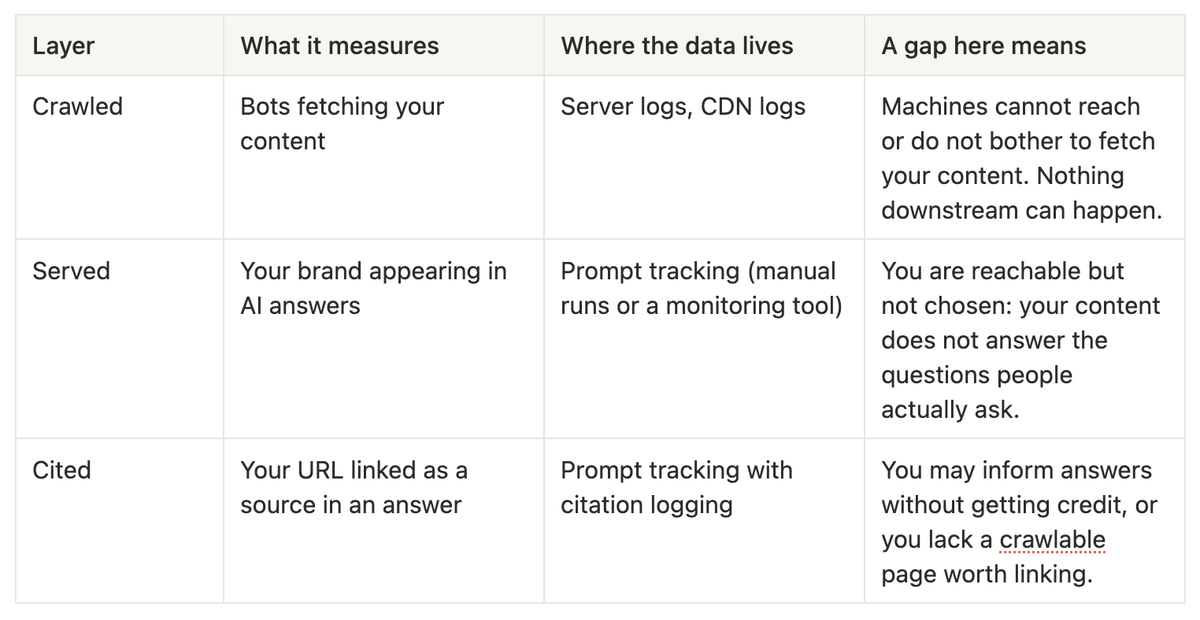
The funnel only moves in one direction. Content that never gets crawled cannot be served. A brand that never gets served will not be cited. So when you diagnose, start at the top.
How do you read your server logs for AI crawlers?
Layer 1 is unglamorous and concrete. Every bot that fetches a page announces itself with a user-agent string, and your web server or CDN records it.
Peec, whose visibility platform we use, published a useful guide on why server logs are crucial for AI search strategy. It sorts AI bot traffic into three types: training bots that collect content for model building, search and indexing bots that keep a retrieval index fresh, and user-query bots that fetch a page live because someone just asked a question. The distinction matters. A training-bot visit might pay off in a model update months from now. A user-query fetch means a real person's question routed a machine to your content in that moment.
The user-agent names map cleanly onto those types. Ahrefs' large-scale log analysis classifies GPTBot and ClaudeBot as training crawlers, ChatGPT-User and Claude-User as assistants browsing on behalf of a user, and OAI-SearchBot and PerplexityBot as retrieval bots answering live queries.
If you have access to raw access logs, a one-line check gets you started:
grep -iE "GPTBot|ClaudeBot|OAI-SearchBot|PerplexityBot|ChatGPT-User|Claude-User" access.log | cut -d' ' -f1,7 | sort | uniq -c | sort -rn
That prints which pages AI bots fetch and how often. If your hosting hides raw logs, most CDN dashboards (Cloudflare, Vercel, Fastly) expose bot traffic by user-agent.
Two things to look for. First, presence: are these bots visiting at all? If robots.txt blocks them, or your content only renders through JavaScript the fetcher never executes, the answer will be no, and no amount of content work downstream will fix it. Second, cadence: fresh, structured content gets revisited. For my profile alone, AI indexes it something like 7,000 times a month. It's coming to check up on all the fresh stuff on a regular basis. That is my observed figure for one profile, not a benchmark; typical crawl volumes for a local expertise business are smaller.
Peec's crawl insights view does this layer without the command line: it reads your log data and charts which AI bots hit which URLs over time, split by bot type.
How do you track serves and mentions?
Layer 2 asks the question your client already answered for you: when someone asks an assistant a question in your category, does your name come up?
The manual method works and costs nothing but time:
- Take your best-performing SEO keywords and your ten most common client questions, and turn them into natural prompts. Not "short term rental management Savannah" but "who should manage my short-term rental in Savannah?" and "is it worth hiring a property manager for one vacation rental?"
- Run each prompt in ChatGPT, Gemini, Perplexity, and Claude. Use fresh conversations so earlier answers do not contaminate later ones.
- Log every business named in each answer in a spreadsheet: prompt, engine, date, brands mentioned, sources linked.
- Repeat monthly. One run is a snapshot; the trend is the signal.
The catch is variance. The same prompt can produce different answers on different days, so a single manual run under-measures and over-excites in equal proportion. This is where a monitoring tool earns its keep. In Peec, you register the prompt set once and it runs daily across engines, turning the noise into rates: how often each engine mentions you for each prompt, how that number moves, and which competitors fill the space where you are absent. The competitor gap view is usually a sobering chart: a list of questions your customers ask where someone else is the answer every single day.
A gap at this layer, with a healthy crawl layer above it, is a content problem, not an access problem. The machines can read you; they just do not find an answer worth repeating. The fix is content that maps to the actual questions: specific, self-contained, one question per page.
How do you track citations?
Layer 3 is the strictest test: not "did the answer mention you" but "did the answer link your URL as a source."
Citations matter for two reasons. They are the one layer that sends traffic, and they compound: a page that engines repeatedly cite is a page they have effectively vouched for, which is worth protecting and updating.
Manually, this is one more column in your logging sheet: for every prompt run, record which URLs the engine cited, yours and everyone else's. Competitor citations are free intelligence. Those are the pages the engines consider reference material for your category; read them and notice what they have that your pages lack.
In Peec, the citations view closes the loop with the crawl data: you can line up which of your URLs get fetched against which get cited. The two mismatches are both diagnostic. Crawled but never cited usually means the page lacks a clear, extractable answer. Mentioned but never linked usually means your proof lives somewhere machines cannot cite: a walled review platform, a PDF, a page that requires JavaScript to render.
What won't this method tell you?
Honest limits, because this method has them.
It will not tell you why. Logs and prompt tracking show that an engine skipped you, not the reasoning inside the model. Diagnosis at layers 2 and 3 is inference, tested by shipping changes and watching the numbers move.
It undercounts. Some fetchers do not identify themselves, some traffic routes through data partnerships and cached indexes, and model memory from past training runs never touches your server at all. Your logs are a floor, not a census.
Prompt tracking is a sample. You are measuring the prompts you chose, not the infinite space of what people actually type. Rotate new prompts in quarterly, sourced from real client conversations.
It does not measure revenue. A citation is not a booking. Tie this data to business outcomes the same way you would any top-of-funnel metric: directionally, over quarters.
And the ground moves. Engines change retrieval behavior without notice, so treat any single week's drop as weather until a month says it is climate.
What to check, in order
When you sit down to measure, run the funnel top to bottom:
- Confirm access: robots.txt is not blocking AI bots you want, and your key pages render as plain, fetchable HTML.
- Pull 30 days of logs and count AI bot hits by user-agent, using the training / search / user-query split to see which kind of attention you are getting.
- Note which URLs get crawled most. That is what the machines think you are about.
- Build a prompt set: top SEO keywords rewritten as natural questions, plus your ten most common client questions.
- Run the set across ChatGPT, Gemini, Perplexity, and Claude, and log mentions and citations per engine.
- Score yourself per layer: crawled yes/no, served how often, cited where.
- Match the gap to the fix: crawl gap means access and structure work, serve gap means content that answers real questions, citation gap means putting proof on open, linkable pages.
- Re-run monthly, manually or with a tracker like Peec, and judge trends, not snapshots.
The engines never went silent. They have been announcing themselves in your logs, composing answers about your category, and handing out citations all along. Search Console is not coming to save you; the funnel is already yours to read.
Here’s the companion stack for this guide: a measurement toolkit with server-log basics, the AI bot user-agent list, and a monthly visibility report template.